HTC NE32 Clip-On Wireless AI Translation Earphones with Smart Touchscreen
HTC NE32 Clip-On Wireless AI Translation Earphones with Smart Touchscreen
Couldn't load pickup availability
Why buy from Oscanna? ✅ Rated 99.7% Positive across 10,799 reviews ✅ UK Company established in 2019 ✅ Fast UK Dispatch — order before 2pm ✅ MFi Certified for Apple Find My ✅ UK Phone Support if you need help
Enjoy wireless freedom with the HTC NE32 Clip-On Wireless Earphones, designed for comfort, convenience and everyday use. With a lightweight clip-on design, Bluetooth 6.0 connectivity and a smart touchscreen charging case, these earphones are ideal for music, calls, social media, gaming and travel.
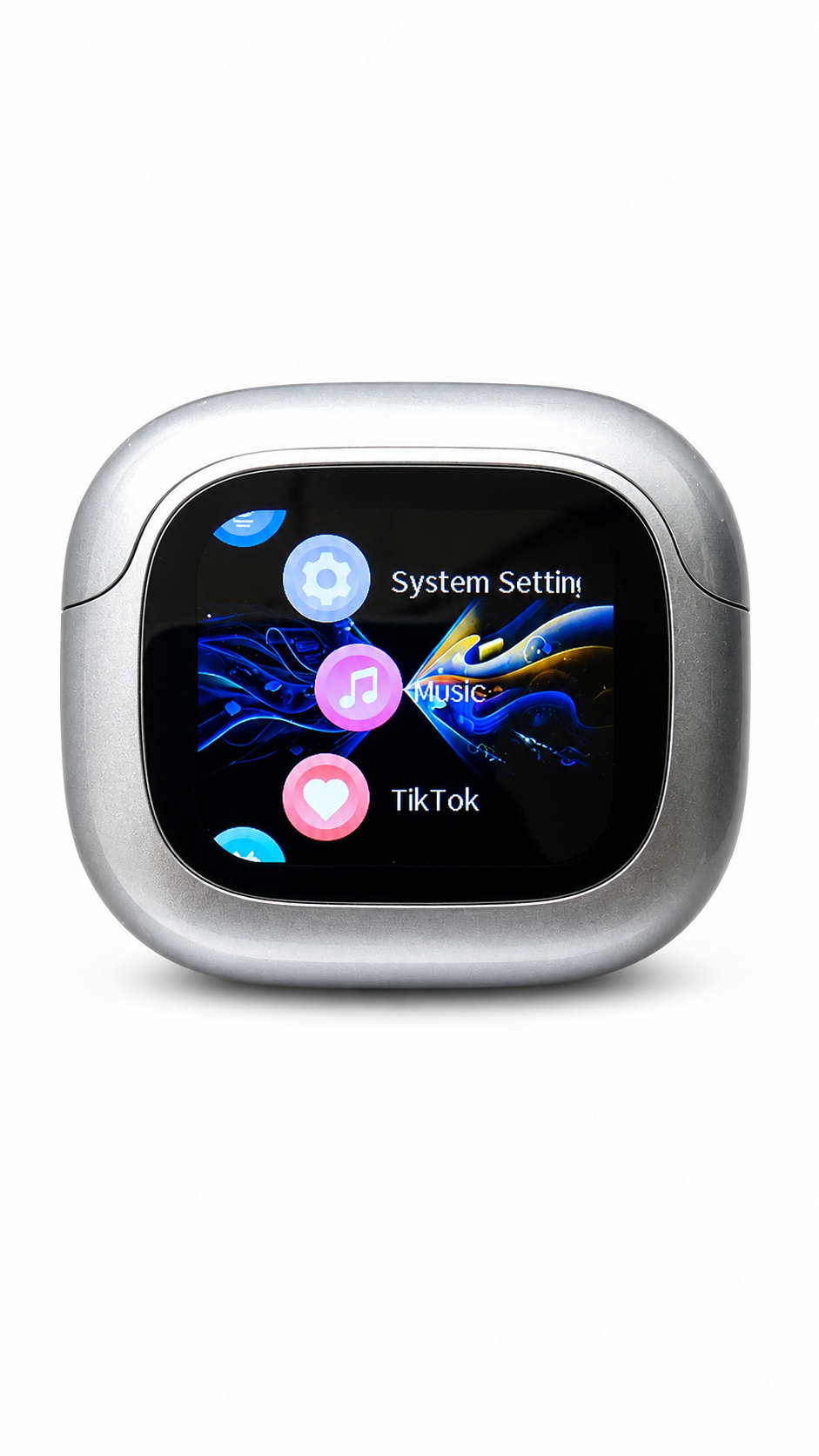
The compact charging case features an interactive display, allowing you to control music, adjust settings, use TikTok controls, activate the voice assistant, change wallpapers, find your earbuds and more. With up to 5 hours of battery life from the earphones and up to 3 extra recharges from the case, the HTC NE32 is built for daily use.
Key Features
-
Clip-On Wireless Design
Comfortable open-ear style for daily listening without blocking your ears completely. -
Bluetooth 6.0 Connection
Fast and stable wireless connection with a range of up to 10 metres. -
Smart Touchscreen Charging Case
Control music, settings, brightness, wallpapers, TikTok functions and more directly from the case screen. -
Up to 5 Hours Playtime
Enjoy up to 5 hours of use from the earphones, with extra charges available from the 500 mAh charging case. -
Game & Music Modes
Switch between Music Mode and Game Mode depending on how you are using the earphones. -
Built-In Touch Controls
Tap the earphones to control music, volume, calls, voice assistant and playback. -
Find My Earbuds Feature
Use the case display to make the left or right earphone beep, helping you locate misplaced earbuds. -
Translation Display Support
Displays translated content when used with the compatible connected translation app. -
TikTok Remote Controls
Control TikTok video navigation and likes directly from the case display on supported devices.
What’s in the Box
- 1 x HTC NE32 charging case
- 2 x HTC NE32 clip-on wireless earphones
- 1 x USB-C charging cable
- 1 x Quick Start Guide
Technical Specifications
| Specification | Details |
|---|---|
| Model | HTC NE32 |
| Bluetooth Version | Bluetooth 6.0 |
| Bluetooth Range | Up to 10 m |
| Speaker Size | 10 mm |
| Speaker Impedance | 16 Ω |
| Earphone Battery Capacity | 40 mAh |
| Earphone Battery Life | Up to 5 hours |
| Earphone Charging Time | Approx. 1.5 hours |
| Charging Case Battery | 500 mAh |
| Charging Case Input | 5 V / 500 mA |
| Charging Case Output | 5 V / 80 mA |
| Charging Case Charging Time | Approx. 2 hours |
| Extra Earphone Charges | Up to 3 full charges |
How to Pair the HTC NE32 Earphones
- Remove both earphones from the charging case.
- One earphone LED will blink white, showing that the earphones are in pairing mode.
- Open Bluetooth settings on your phone.
- Select “HTC NE32” from the available devices list.
- Once connected, you will hear a confirmation sound.
The earphones will automatically reconnect to the previously paired device when removed from the case.
Touch Controls
| Function | Control |
|---|---|
| Play / Pause | Tap either earphone once |
| Volume Up | Tap the right earphone twice |
| Volume Down | Tap the left earphone twice |
| Previous Track | Tap the left earphone three times |
| Next Track | Tap the right earphone three times |
| Answer / End Call | Tap either earphone once |
| Reject Call | Press and hold either earphone for 2 seconds |
| Voice Assistant | Press and hold the left earphone for 2 seconds |
| Game / Music Mode | Press and hold the right earphone for 2 seconds |
Smart Case Display Features
The HTC NE32 charging case includes a built-in display with several useful features:
- Music controls
- Volume control
- Equalizer presets
- TikTok remote control
- Find My Earbuds
- Camera remote function
- Voice assistant activation
- Screen brightness adjustment
- Wallpaper settings
- Time and date settings
- Language settings
- Tap-to-wake control
- Translation display support
- Built-in mini game
Frequently Asked Questions
How long does the HTC NE32 battery last?
The earphones provide up to 5 hours of battery life on a single charge. The charging case can recharge the earphones up to 3 additional times when fully charged.
Do these earphones work with iPhone and Android?
Yes, the HTC NE32 connects via Bluetooth and can be used with most Bluetooth-enabled iPhone and Android devices.
How do I reset the HTC NE32 earphones?
If the earphones fail to pair or reconnect, tap both earphones five times simultaneously. This will reset the earphones and clear the Bluetooth pairing history.
Does the case screen control TikTok?
Yes, the case display includes TikTok controls for supported devices. On iPhone, AssistiveTouch may need to be enabled in the phone’s accessibility settings.
Can I use only one earphone?
Yes, you can use a single earphone. Some features, such as switching between Game and Music modes, may not be available when using only one earphone.
Does the HTC NE32 support translation?
The translation feature displays translated content when used with the compatible connected app.
Share